Technical details
This section contains implementation details of features that cannot be reliably implemented with Blender's current Python API, and had to be worked around in one way or another.
Tracking remapped keyboard shortcuts
A short note on Blender's keymap system
In Blender, by keyboard shortcut we mean a key map item
(bpy.types.KeyMapItem).
Each shortcut the user can edit corresponds to an instance of a key map item.
Fortunately, the Python API lets add-ons modify these items.
Key map items are arranged in key maps
(bpy.types.KeyMap),
which are simply collections of key map items associated with a certain
context (a region type and a space type, or a modal operator) and a name.
Sometimes key maps contain a special kind of key map item, key map item diffs, which describe a substitution of a key map item from another instance of the same key map by another item, possibly null to describe additions/removals. However, this distinction is not exposed to the Python API.
Unlike what the user interface suggests, key maps are not arranged in any
hierarchy. The hierarchy displayed in the Preferences > Keymap menu is purely
artificial.
Instead, key maps are arranged in key configs
(bpy.types.KeyConfig).
You may be tempted to think that key configs simply correspond to the
different keymap presets you can select in the Preferences > Keymap menu
dropdown.
However, this is again a user interface lie.
In the first place, the active key map items used by Blender to process
your input come from a virtual key config, what the Python API calls
the user key config.
This user key config is built by merging the active key config
(the preset chosen from the Preferences > Keymap menu dropdown)
with the user diff key config (not exposed to the Python API),
and the addons key config, where add-ons are invited to register their
own key maps and key map items.
All these key configs are managed by the key configurations
(bpy.types.KeyConfigurations).
The user diff key config, where changes made in the Preferences > Keymap menu
are stored in, has no relation to the keymap preset the user selects in the
Preferences > Keymap menu dropdown.
Instead, it is a single key config stored in the userpref.blend,
containing key map item diffs.
Info
In particular, this means that changes you make in the Preferences > Keymap menu
affect all the presets you can choose.
This is of course opinable behavior, but I feel the user interface does not convey
this clearly enough, and has lead to a lot of frustration on my part.
I also believe it is not the most useful behavior for the user.
Unfortunately, despite the fact that key map items have a unique identifier
(KeyMapItem.id, not to be confused with KeyMapItem.idname), this id
is not stable across Blender restarts.
If the order in which addons create keyboard shortcuts changes between
restarts, the ids of key map items will also change.
Also, if the user modifies a key map item, its id can sometimes change.
You may be wondering right now ''Wait, didn't Blender use diffs?''
Didn't Blender use key map item diffs to merge user modifications from the user key config into the active key config?". How can Blender reliably apply these differences if the IDs are not stable?
The answer is it simply doesn't.
Blender compares key map items by value, disregarding their id.
See:
blender/windowmanager/intern/wm_keymap.cc#wm_keymap_item_equals_resultblender/windowmanager/intern/wm_keymap.cc#wm_keymap_item_equals
As you can see, Blender matches two key map items by checking that the following properties (as named from the Python API) are equal:
idname, the operator executedproperties, the RNA properties applied to the operatoractive, the flag indicating whether the shortcut is activepropvalue, the value the event translates to in the case of modal key maps
However, it first tries to refine the comparison by also comparing the assignment of the key map item first, i.e., comparing the properties (as named from the Python API):
type, the name of the key/mouse event/NDOF event/input event matchedvalue, the subtype of input event (e.g.,PRESS,RELEASE,DRAG,DOUBLE_CLICK, ...)- the modifiers (
shift,ctrl,alt,oskey,hyperand thekeymodifier) map_type, the type of input event (e.g.KEYBOARD,MOUSE,NDOF,TEXTINPUT,TIMER)- (only for drag events)
direction, the direction of the drag (ANY,NORTH,NORTH_EAST,EAST, ...) - (only for keyboard events)
repeat, the flag indicating whether the shortcut accepts repeat events
As a silver lining, all the compared properties are exposed to the Python API, so we can at least reliably emulate the same logic.
Glitchy shortcuts
Blender's behavior for comparing key map items by value is what I suspect causes some
glitchy keyboard shortcuts to reset ever so often, such as the built-in shortcuts for
Node Duplicate node.duplicate_move (Shift + D).
Why?
The node.duplicate_move operator has remarkably complex properties, as it includes as properties
the linked properties of two other operators: node.duplicate and node.translate_attach,
the last of which also contains two pointers to two other operators as properties:
transform.translate and node.attach.
I suspect that there is a problem during serialization or comparison of these properties that leads to the user diff to not be matched correctly sometimes.
This glitchy behavior can be observed even without the extension,
editing the shortcut for node.duplicate_move while the shortcut is expanded,
and then editing back to the default value often leaves the shortcut marked as user-modified,
unlike any other shortcut, where the default value is recognized properly.
How we track remapped keyboard shortcuts
As you can see, the only reliable way to track keyboard shortcuts across restarts in Blender is by comparing them by value (all their properties), trying to refine the comparison if that is not enough, by comparing their assigned input events.
This is particularly troublesome in our case, because we are also modifying the assigned keys. What we do in the case where we need to refine the comparison is:
- Try to match first with the remapped key.
- If that fails, try to match with the key we remapped from, in case our remapping was undone during the restart or due to a glitchy shortcut.
This extension stores a fingerprint of each remapped keyboard shortcut in a JSON string property within the extension's addon preferences. Naturally, this string property is not exposed to the user for direct editing.
You may inspect the list of fingerprints from the add-on's preferences panel
Navigate to Preferences > Add-ons > Keyboard Layout Emulation > Debug add-on preferences.
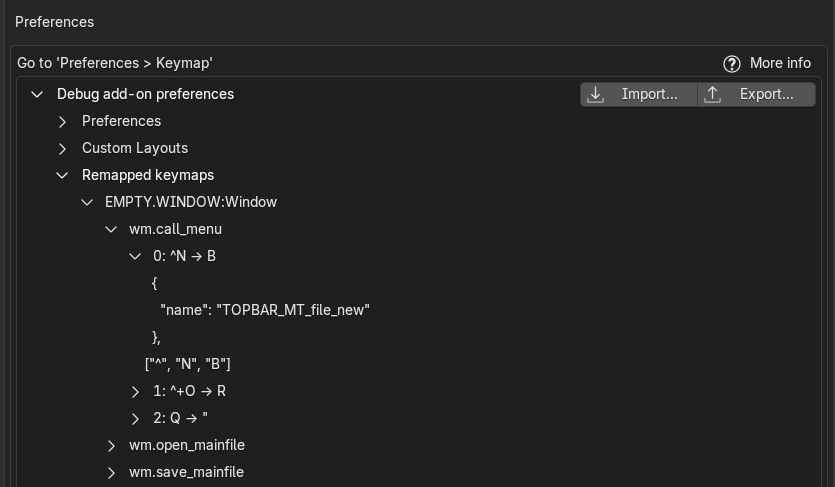
Alternatively, the wm.kle_export_addon_preferences operator (the Export... button above)
has some options (marked as only for debug), to include this dictionary in the exported JSON file.
To save space in the JSON file, the fingerprints we store only include the operator
properties that are truthy (i.e., true, non-zero or non-empty).
We only store properties that are relevant for the comparison of keyboard keymap items.
In particular, we ignore direction, which is exclusive for drag events.
Furthermore, all modifier flags are compacted in a single string, using a similar notation
to AutoHotKey's modifier symbols.
We use the ~ prefix to denote an ignored modifier in the string, and the * suffix
to denote a shortcut that accepts repeat events.
Blender supports more fine-grained control over modifier matching than the UI suggests
Each of the four (five including the hyper modifier in some Linux systems) can be set
as required (1), rejected (0) or ignored (-1).
However, the UI only displays two states for each modifier, which should be interpreted
as not rejected (≠ 0, the button is on) and rejected (= 0, the button is off).
Users can set all keys at once to ignored by pressing the Any button, which will
appear to enable all modifiers.
However, after setting all keys to ignored, if the user disables any single one
and re-enables it again, its value will no longer be ignored, but required,
leaving the others as ignored.
This difference is only reflected in the fact that the Any button will appear to be
disabled if not all modifiers are set to ignored, and the short description of the
key map item assignment will only include the required modifiers, not the ignored ones.
The JSON list of fingerprints takes around 100 kiB of space for a factory Blender installation
Reapplying emulation on restart
It is a known issue that add-on's keyboard shortcuts cannot be reliably edited by users in Blender. This seems to happen because they can be registered way too late, after the user diff key config has been merged into the active key config, and its incorrect entries, corresponding to add-on shortcuts that were not matched, are pruned.
To ensure keyboard layout emulation correctly applies to add-on shortcuts, we reapply emulation whenever Blender is restarted (if emulation was enabled). Reapplying emulation is done by taking care to not remap any shortcut twice over, thanks to the key map item fingerprints we store during emulation.
Info
Since we do not have any control over the order in which addons are loaded at startup,
this task is always scheduled with a 0 seconds delay, to try to postpone it until
Blender is done loading the add-on.
To improve the chances that we catch any add-on shortcuts that were registered a little late, we also reapply emulation a few seconds afterwards, to catch any add-ons that were registered after us.
This delay is configurable in the extension's preferences. It is also possible to disable this feature altogether, if for some reason it becomes problematic for you.
Note
In addition to add-on shortcuts, some glitchy shortcuts (e.g., node.duplicate_move) are also
unreliably editable by users, and may get reset when the user loads a new file (or even when
editing other key map items/exporting a key map preset).
Hence, we also reapply emulation whenever the user loads a new file.
Performance
Reapplying emulation for just a few shortcuts often has an imperceptible performance impact. This add-on should not perceptibly increase the time Blender takes to start.
Detecting addon installation
In order to provide a better user experience, this extension can also detect when you install or activate other add-ons (e.g., if you enable Node Wrangler). This way, we can immediately reapply the emulation to also remap their shortcuts. This only happens if you have enabled emulation.
The Python API does not provide a way to detect add-on installation/activation.
What we do instead is insert draw code into the Preferences > Add-ons and the
Preferences > Get Extensions menus.
This draw code does not alter the interface in any way.
However, it allows us to get notified whenever either of these two menus are updated,
for example, if you click any button there.
Performance
Since draw calls can be very frequent and should not be abused to run any expensive code (even though checking for changes in enabled add-ons is a relatively lightweight operation), we defer our check to a scheduled task.
This scheduled task is managed so that it runs at least once, 1 second after the last draw update, and never more than once per second.
The polling interval of 1 second can be adjusted, but there should be no need. The performance impact of this polling should be absolutely negligible. However, you may still turn this behavior off in the extension's preferences, which completely removes the draw code inserted in the menus.
JSON encoding
We encode sets in JSON as lists prepended with a ¦set prefix, where
¦ is the broken bar character, \u00a6.
We escape ¦ by duplication if it occurs as the first character of the
first string of a list.
Performance
We store the list of remapped keymap fingerprints, as well as user-defined keyboard layouts as JSON properties within the add-on's preferences. Deserialization of these properties is cached, because they are accessed during draw calls.
Cool extension, why don't you fix Blender instead?
After all, Blender is open source. Why not fix the key map system if it is so impractical?
The answer is simple. Writing this extension took me a week (after the first week I spent understanding how messed up is the keymap system implementation).
Fixing Blender's keymap system on the other hand, is not a task for a single person. There is a lot that needs to be redesigned and discussed before any change can take place.
Furthermore, it is not a change that can be merged lightly into Blender, as it will affect almost every user in one way or another. Despite any changes that we make, we must still be able to import every user's existing keymaps from previous Blender versions.
This means that for fixing my problems, I would have to:
- Spend a lot of time discussing with other designers and developers, something I would enjoy because Blender's community is very friendly, but the amount of time cannot be understated.
- Wait a long time, possibly until the next major release of Blender, since the change would have to sit for a long time for proper testing on all platforms and by beta testers.
I will try to improve Blender in my spare time, but I don't have much. For the time being, I can at least use Blender with my Dvorak layout (with add-ons).
Why not just use QWERTY?
My inner peace committee vetoed this idea unanimously.